Translating
There are two ways to translate phrases:
- Manually translate generated JSON file by
php artisan fbt:generate-translationsand then use thephp artisan fbt:translatecommand. - Manually add translations to the database and then use the
php artisan fbt:translatecommand. - Use the app editor Swiftyper Translations.
Command to generate missing translation hashes from collected source strings:
⚠️ NOTE: This command is required only if you are using json driver.
php artisan fbt:generate-translations --translation-input=./storage/fbt/translation_input.json
# or
php artisan fbt:generate-translations --translations=./storage/fbt/translations/*.json
Options:
| name | default | description |
|---|---|---|
| --src | FbtConfig::get('path')/.source_strings.json | Path to collected source strings file |
| --translation-input | FbtConfig::get('path')/translation_input.json | Path to translation input file |
--translations=[path] | none | The translation files containing translations. E.g. --translations=./storage/fbt/translations/*.json |
Artisan command to convert provided translations to jenkins:
php artisan fbt:translate
# or
php artisan fbt:translate --stdin < translation_input.json
# or
php artisan fbt:translate --translations=./storage/fbt/translations/*.json
Options:
| name | default | description |
|---|---|---|
| --pretty | no | Pretty print the translation output |
--translations=[path] | none | The translation files containing translations. If not specified, the translations are retrieved from the database. E.g. --translations=/path/to/translations/*.json |
| --stdin < translation_input.json | none | Instead of reading translation files and source file separately, read monolithic JSON file from STDIN |
JSON schema:
In addition to the below example, the translation_input.json
provided in our tests
is a good reference on the "schema" used for the translations.
{
  "phrases": [
    "hashToText": {
      <text_hash>: <text>,
      ...
    },
    "jsfbt": string|{t:<table>, m:<metadata>}
  ],
  ...
  "translationGroups": [{
    "fb-locale": "xx_XX",
    "translations": {
      <translation_hash>: {
        "tokens": [<token1>, ..., <tokenN>],
        "types": [<variationType1>, ..., <variationTypeN>]
        "translations": [{
            "translation": <translation1>,
            "variations": [variationValue1,...,variationValueN]
          },
          ...,
        ]
      }
    }
  }]
}
The <text_hash> and <translation_hash> correspond in the above example.
That is translations[<hash>] is the translation entry for
phrases.hashToText[<hash>].
Here tokens, types and variations are all associative arrays. That is, in
the above example, types[i] represents the variation type (or mask) of
tokens[i] and variations[i] is the variation value of token[i] for the
given translation entry.
Database schema:
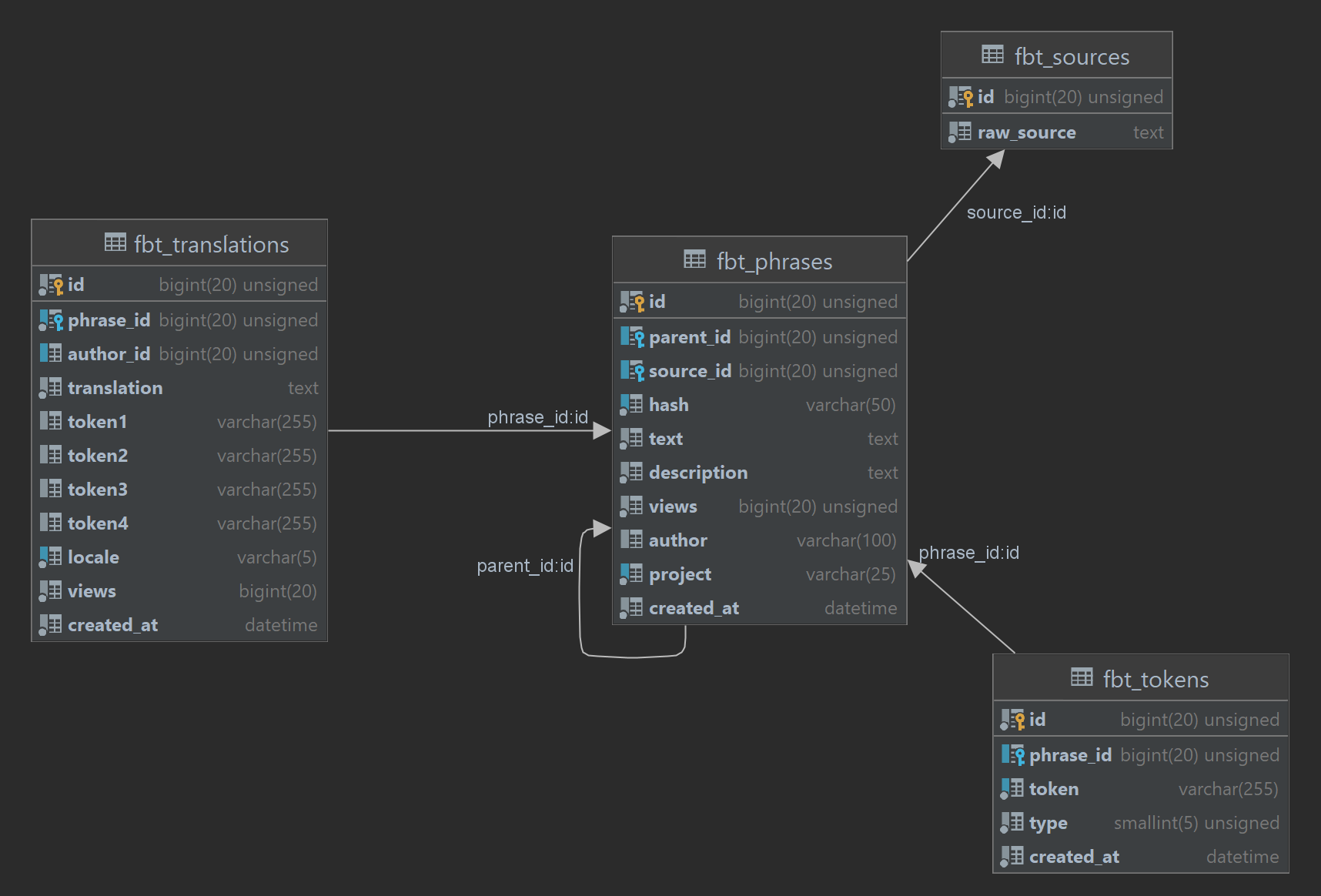
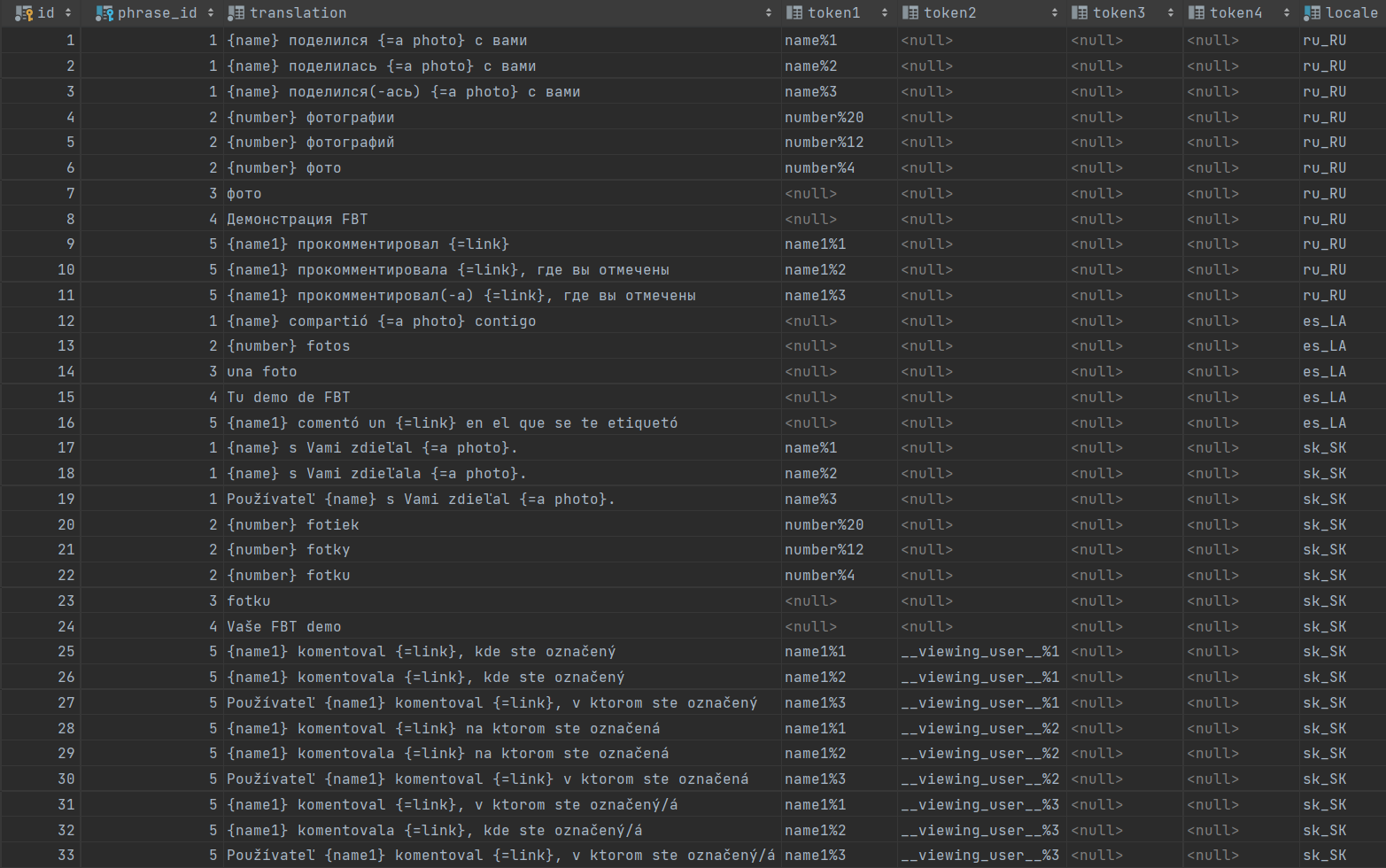
Example translation:
fbt_phrases

translations
If you use tokens, they must be defined in same order and the following form: token_name%token_type.
 ...
...
Variation types
Variation types can be one of
IntlVariations::BITMASK_NUMBER: 28
IntlVariations::BITMASK_GENDER:  3
This signifies what the given token can variate on. Token types of type GENDER can be:
IntlVariations::GENDER_MALE:    1
IntlVariations::GENDER_FEMALE:  2
IntlVariations::GENDER_UNKNOWN: 3
while token types of NUMBER can be:
IntlVariations::NUMBER_ONE:    4
IntlVariations::NUMBER_TWO:    8
IntlVariations::NUMBER_MANY:  12
IntlVariations::NUMBER_ZERO:  16
IntlVariations::NUMBER_FEW:   20
IntlVariations::NUMBER_OTHER: 24